kit For Learning Course
In this section, we will use the components in this kit to expand our learning, gradually mastering the principles and functional characteristics of each component in order of depth, and completing the corresponding program writing.
The sixth code is the complete code for this kit “ESP32 DIY Electronic Piano,” which you can click here to view.
1. Breathing-Lamp
Wiring diagram
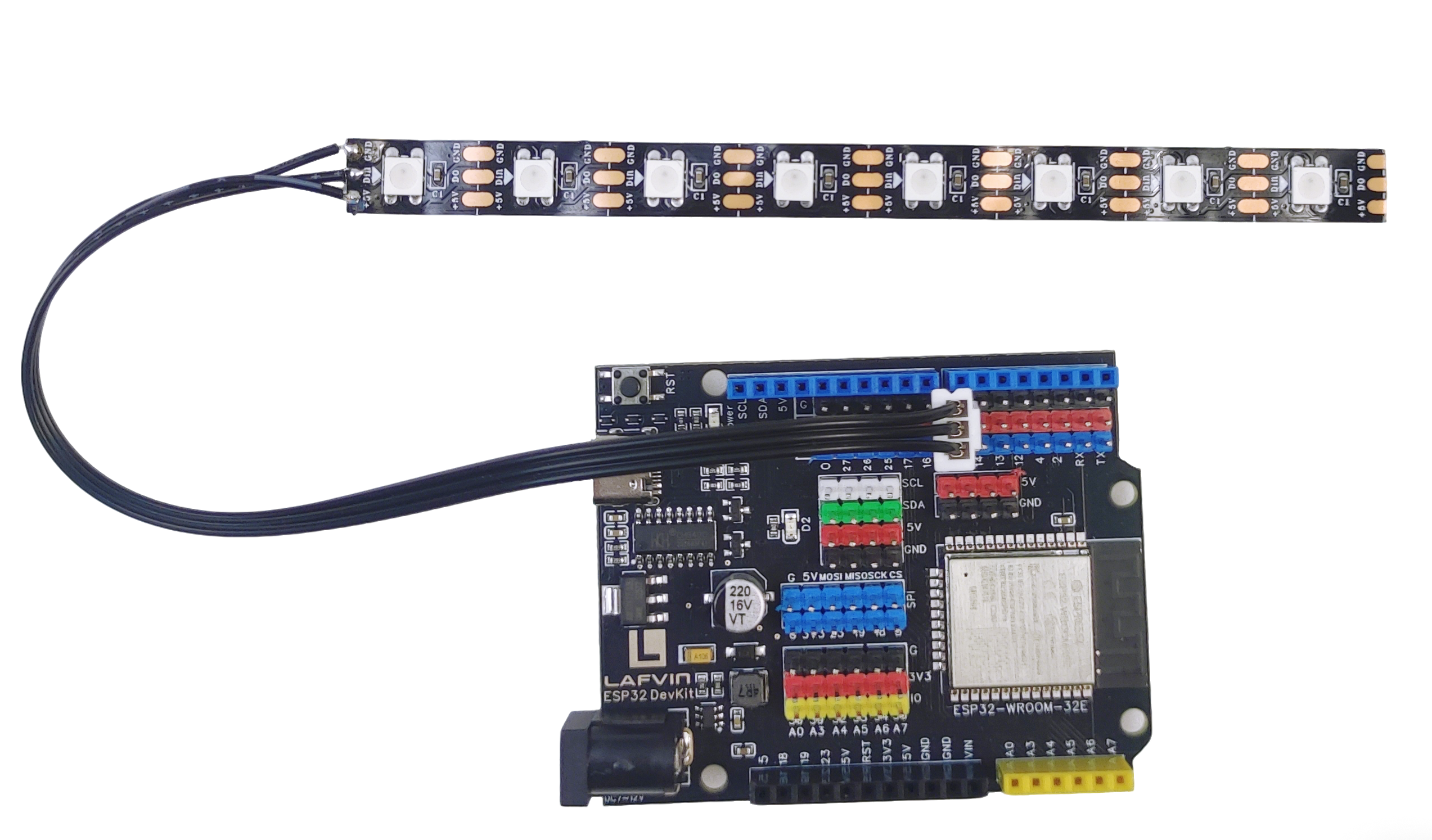
RGB —— ESP32 IO15
Example code
   #include <Adafruit_NeoPixel.h>

   #define LED_PIN    15      // Data pin connected to GPIO15
   #define LED_COUNT  1       // Using 1 LED only

Adafruit_NeoPixel strip(LED_COUNT, LED_PIN, NEO_GRB + NEO_KHZ800);

// Breathing effect variables
int brightness = 0;    // Current brightness (0-255)
int fadeAmount = 1;    // How much to change brightness each time
int delayTime = 15;    // Delay between updates (ms)

void setup() {
 strip.begin();
 strip.show();  // Initialize all pixels to 'off'
 strip.setBrightness(255);  // Set maximum brightness for strip

 Serial.begin(115200);
 Serial.println("RGB Breathing LED Test");
 Serial.println("LED should slowly breathe (fade in and out)");
}

void loop() {
 // Set LED color with current brightness (red color)
 strip.setPixelColor(0, brightness, 0, 0);
 strip.show();

 // Change brightness for next time
 brightness = brightness + fadeAmount;

 // Reverse direction at the ends of fade
 if (brightness <= 0 || brightness >= 255) {
   fadeAmount = -fadeAmount;
 }

 delay(delayTime);
}
Achieved Effect
The first LED in the RGB light is red, and it goes from bright to dim and then bright again, just like breathing.
2. Button_Count
Wiring diagram
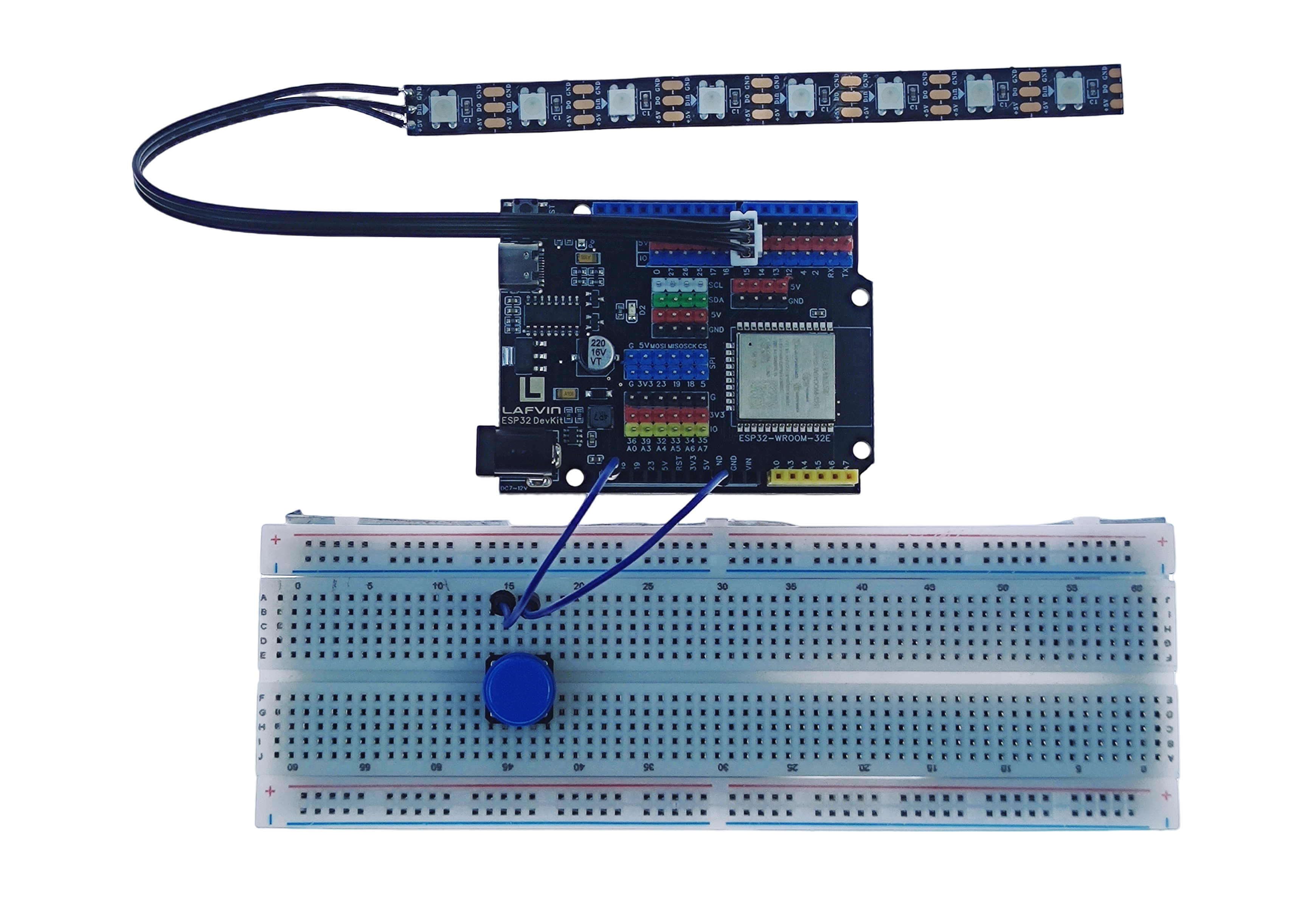
RGB —— ESP32 IO15
Button —— ESP32 IO5
Example code
#include <Adafruit_NeoPixel.h>

// Pin definitions
#define BUTTON_PIN 5      // Button connected to GPIO13
#define LED_PIN    15      // LED strip data pin connected to GPIO15
#define LED_COUNT  1       // Using 1 LED

Adafruit_NeoPixel strip(LED_COUNT, LED_PIN, NEO_GRB + NEO_KHZ800);

// Variables
int pressCount = 0;       // Button press counter
bool lastButton = false;  // Previous button state

void setup() {
 // Configure button pin with internal pull-up
 pinMode(BUTTON_PIN, INPUT_PULLUP);

 // Initialize LED strip
 strip.begin();
 strip.show();  // Turn off all LEDs
 strip.setBrightness(50);

 // Initialize serial communication
 Serial.begin(115200);
 Serial.println("Button Counter Started");
 Serial.println("Press button: LED turns RED, counter increases");
 Serial.println("Release button: LED turns OFF");
}

void loop() {
 // Read button state (LOW = pressed when using INPUT_PULLUP)
 bool buttonPressed = digitalRead(BUTTON_PIN) == LOW;

 // Control RGB LED
 if (buttonPressed) {
   strip.setPixelColor(0, strip.Color(255, 0, 0));  // Red when pressed
   strip.show();
 } else {
   strip.setPixelColor(0, strip.Color(0, 0, 0));    // Off when released
   strip.show();
 }

 // Detect button press (rising edge detection)
 if (buttonPressed && !lastButton) {
   pressCount++;  // Increment counter

   Serial.print("Button pressed! Total: ");
   Serial.println(pressCount);
 }

 // Save current state for next loop
 lastButton = buttonPressed;

 // Small delay for stability
 delay(50);
}
Achieved Effect
Press the button and the first LED of the RGB light will light up.
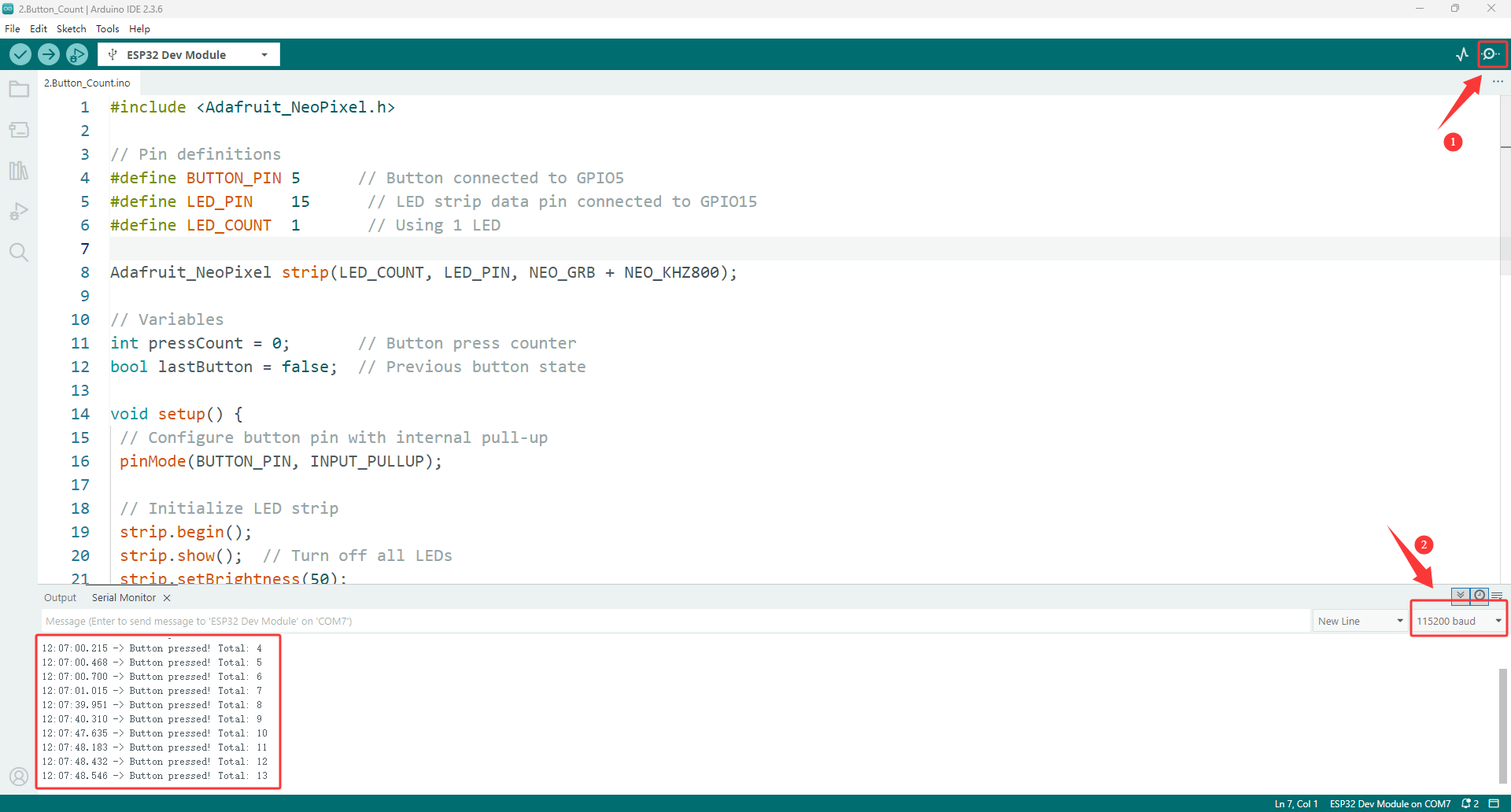
Open the serial monitor, which will record the number of times the button was pressed.
3. Rgb_Color_Lamp
Wiring diagram
RGB —— ESP32 IO15
Button —— ESP32 IO5
Example code
#include <Adafruit_NeoPixel.h>

#define BUTTON_PIN 5
#define LED_PIN    15
#define LED_COUNT  8

Adafruit_NeoPixel strip(LED_COUNT, LED_PIN, NEO_GRB + NEO_KHZ800);

// Simple variables
int mode = 0;           // 0=Off, 1=Red, 2=Green, 3=Blue, 4=Rainbow, 5=Wave
int brightness = 100;
bool lastButton = HIGH;
unsigned long pressTime = 0;
int animationStep = 0;

void setup() {
 pinMode(BUTTON_PIN, INPUT_PULLUP);
 strip.begin();
 strip.setBrightness(brightness);
 Serial.begin(115200);
 Serial.println("8-LED Interactive Light Ready");
 updateAllLEDs();
}

void loop() {
 bool button = digitalRead(BUTTON_PIN);

 // Button pressed
 if (button == LOW && lastButton == HIGH) {
   pressTime = millis();
 }

 // Button released
 if (button == HIGH && lastButton == LOW) {
   unsigned long holdTime = millis() - pressTime;

   if (holdTime < 500) {
     // Short press: change mode
     mode = (mode + 1) % 6;
     if (mode == 0) mode = 1;  // Skip off mode when cycling
     Serial.print("Mode: ");
     Serial.println(mode);
     updateAllLEDs();
   } else {
     // Long press: change brightness
     brightness += 80;
     if (brightness > 255) brightness = 30;
     strip.setBrightness(brightness);
     Serial.print("Brightness: ");
     Serial.println(brightness);
     updateAllLEDs();
   }
 }

 lastButton = button;

 // Run animations for mode 4 and 5
 if (mode == 4 || mode == 5) {
   runSimpleAnimation();
 }

 delay(10);
}

void updateAllLEDs() {
 strip.clear();

 if (mode == 0) {
   // All off
   for (int i = 0; i < LED_COUNT; i++) {
     strip.setPixelColor(i, 0, 0, 0);
   }
 }
 else if (mode == 1) {
   // All red
   for (int i = 0; i < LED_COUNT; i++) {
     strip.setPixelColor(i, 255, 0, 0);
   }
 }
 else if (mode == 2) {
   // All green
   for (int i = 0; i < LED_COUNT; i++) {
     strip.setPixelColor(i, 0, 255, 0);
   }
 }
 else if (mode == 3) {
   // All blue
   for (int i = 0; i < LED_COUNT; i++) {
     strip.setPixelColor(i, 0, 0, 255);
   }
 }
 else if (mode == 4) {
   // Rainbow (will be animated)
   return;
 }
 else if (mode == 5) {
   // Chase effect (will be animated)
   return;
 }

 strip.show();
}

void runSimpleAnimation() {
 strip.clear();
 animationStep++;

 if (mode == 4) {
   // Rainbow animation
   for (int i = 0; i < LED_COUNT; i++) {
     int hue = (animationStep * 10 + i * 30) % 360;
     hue = hue * 65536L / 360;
     strip.setPixelColor(i, strip.gamma32(strip.ColorHSV(hue, 255, brightness)));
   }
 }
 else if (mode == 5) {
   // Chase animation
   for (int i = 0; i < LED_COUNT; i++) {
     if ((i + animationStep) % 3 == 0) {
       strip.setPixelColor(i, 255, 0, 0);
     } else if ((i + animationStep) % 3 == 1) {
       strip.setPixelColor(i, 0, 255, 0);
     } else {
       strip.setPixelColor(i, 0, 0, 255);
     }
   }
 }

 strip.show();
 delay(100);
}
Achieved Effect
Press the button, and the RGB lights will switch between different lighting effects.
4. Single ToneGenerator
Wiring diagram
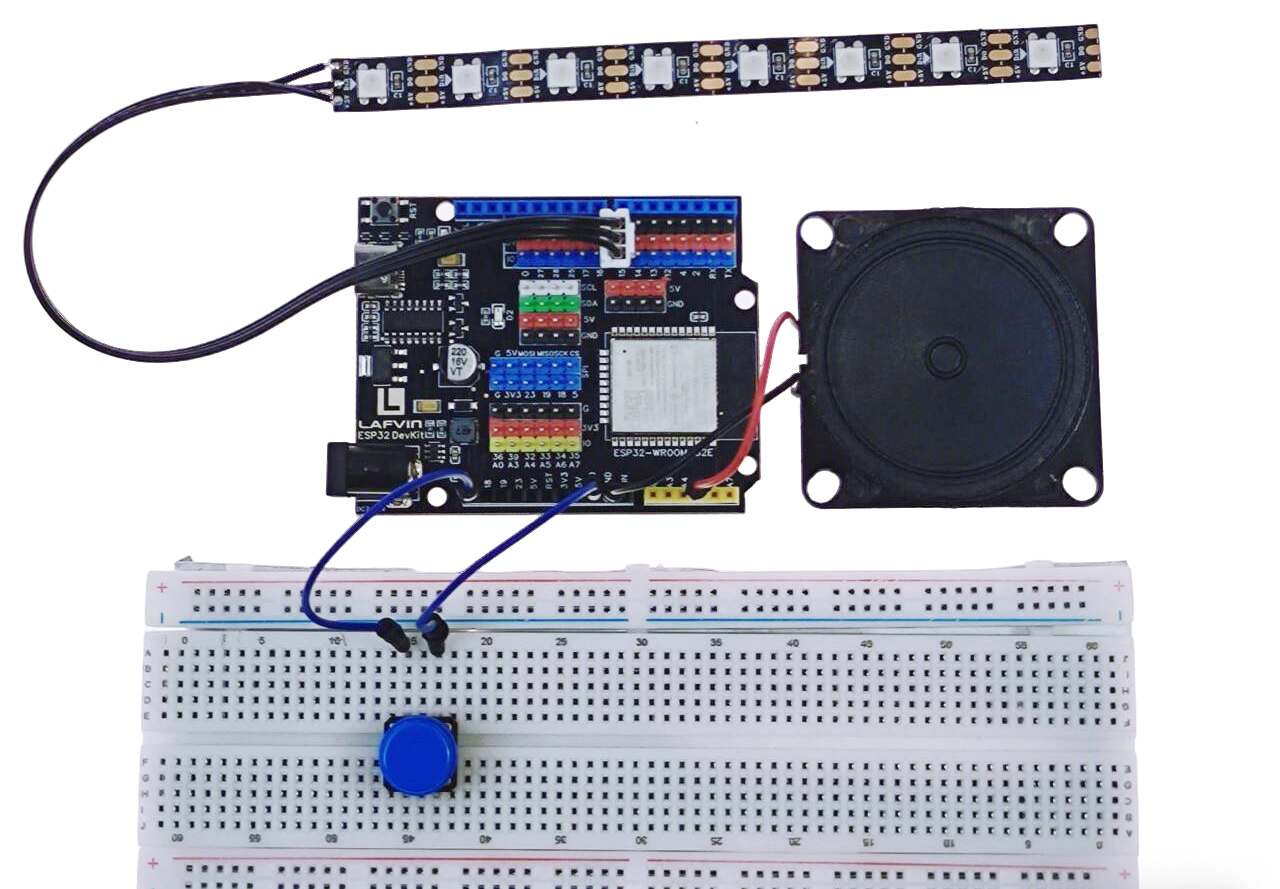
RGB —— ESP32 IO15
Button —— ESP32 IO5
Speaker —— ESP32 IO33
Example code
#include <Adafruit_NeoPixel.h>

// Pin definitions
#define BUTTON_PIN 5      // Button to change notes
#define SPEAKER_PIN 33    // Speaker positive pin (negative to GND)
#define LED_PIN    15     // LED for visual feedback

#define LED_COUNT 1

Adafruit_NeoPixel strip(LED_COUNT, LED_PIN, NEO_GRB + NEO_KHZ800);

// Musical notes frequencies (Hz) - C Major Scale
const int notes[] = {
 262,  // C4 - Do
 294,  // D4 - Re
 330,  // E4 - Mi
 349,  // F4 - Fa
 392,  // G4 - Sol
 440,  // A4 - La
 494   // B4 - Si
};

const char* noteNames[] = {
 "Do (C4)",
 "Re (D4)",
 "Mi (E4)",
 "Fa (F4)",
 "Sol (G4)",
 "La (A4)",
 "Si (B4)"
};

// Colors for each note
uint32_t noteColors[] = {
 strip.Color(255, 0, 0),     // Do - Red
 strip.Color(255, 128, 0),   // Re - Orange
 strip.Color(255, 255, 0),   // Mi - Yellow
 strip.Color(0, 255, 0),     // Fa - Green
 strip.Color(0, 128, 255),   // Sol - Light Blue
 strip.Color(0, 0, 255),     // La - Blue
 strip.Color(128, 0, 255)    // Si - Purple
};

// Variables
int currentNote = 0;          // Current note index (0-6)
bool lastButtonState = HIGH;
unsigned long lastPressTime = 0;

// Speaker setup
#define SPEAKER_CHANNEL 0

void setup() {
 Serial.begin(115200);

 // Setup button
 pinMode(BUTTON_PIN, INPUT_PULLUP);

 // Setup speaker with LEDC
 ledcSetup(SPEAKER_CHANNEL, 2000, 8);
 ledcAttachPin(SPEAKER_PIN, SPEAKER_CHANNEL);

 // Setup LED
 strip.begin();
 strip.show();
 strip.setBrightness(100);

 // Show current note
 updateDisplay();

 Serial.println("Tone Generator with Speaker");
 Serial.println("Short press: Change to next note");
 Serial.println("----------------------");
}

void loop() {
 bool buttonState = digitalRead(BUTTON_PIN);

 // Button pressed (detect falling edge)
 if (buttonState == LOW && lastButtonState == HIGH) {
   // Simple debounce
   delay(50);

   if (digitalRead(BUTTON_PIN) == LOW) {
     // Change to next note
     changeNote();

     // Play the new note briefly
     playNoteBriefly();
   }
 }

 lastButtonState = buttonState;
 delay(10);
}

void changeNote() {
 // Move to next note
 currentNote = (currentNote + 1) % 7;

 updateDisplay();

 // Visual feedback
 for (int i = 0; i < 2; i++) {
   strip.setPixelColor(0, strip.Color(255, 255, 255));
   strip.show();
   delay(50);
   strip.setPixelColor(0, noteColors[currentNote]);
   strip.show();
   delay(50);
 }
}

void playNoteBriefly() {
 Serial.print("Playing: ");
 Serial.print(noteNames[currentNote]);
 Serial.print(" (");
 Serial.print(notes[currentNote]);
 Serial.println(" Hz)");

 // Play note on speaker
 ledcWriteTone(SPEAKER_CHANNEL, notes[currentNote]);

 // Visual feedback - bright LED
 strip.setPixelColor(0, noteColors[currentNote]);
 strip.setBrightness(200);
 strip.show();

 // Play for 300ms
 delay(300);

 // Stop speaker
 ledcWriteTone(SPEAKER_CHANNEL, 0);

 // Dim LED back
 strip.setBrightness(100);
 strip.show();
}

void updateDisplay() {
 Serial.println("----------------------");
 Serial.print("Current note: ");
 Serial.println(noteNames[currentNote]);
 Serial.print("Frequency: ");
 Serial.print(notes[currentNote]);
 Serial.println(" Hz");
 Serial.println("----------------------");

 // Update LED color
 strip.setPixelColor(0, noteColors[currentNote]);
 strip.setBrightness(100);
 strip.show();
}
Achieved Effect
Press the button, and the speaker will play the Do-Si syllables in sequence and light up different colored lights.
5. Triple Bond Piano
Wiring diagram
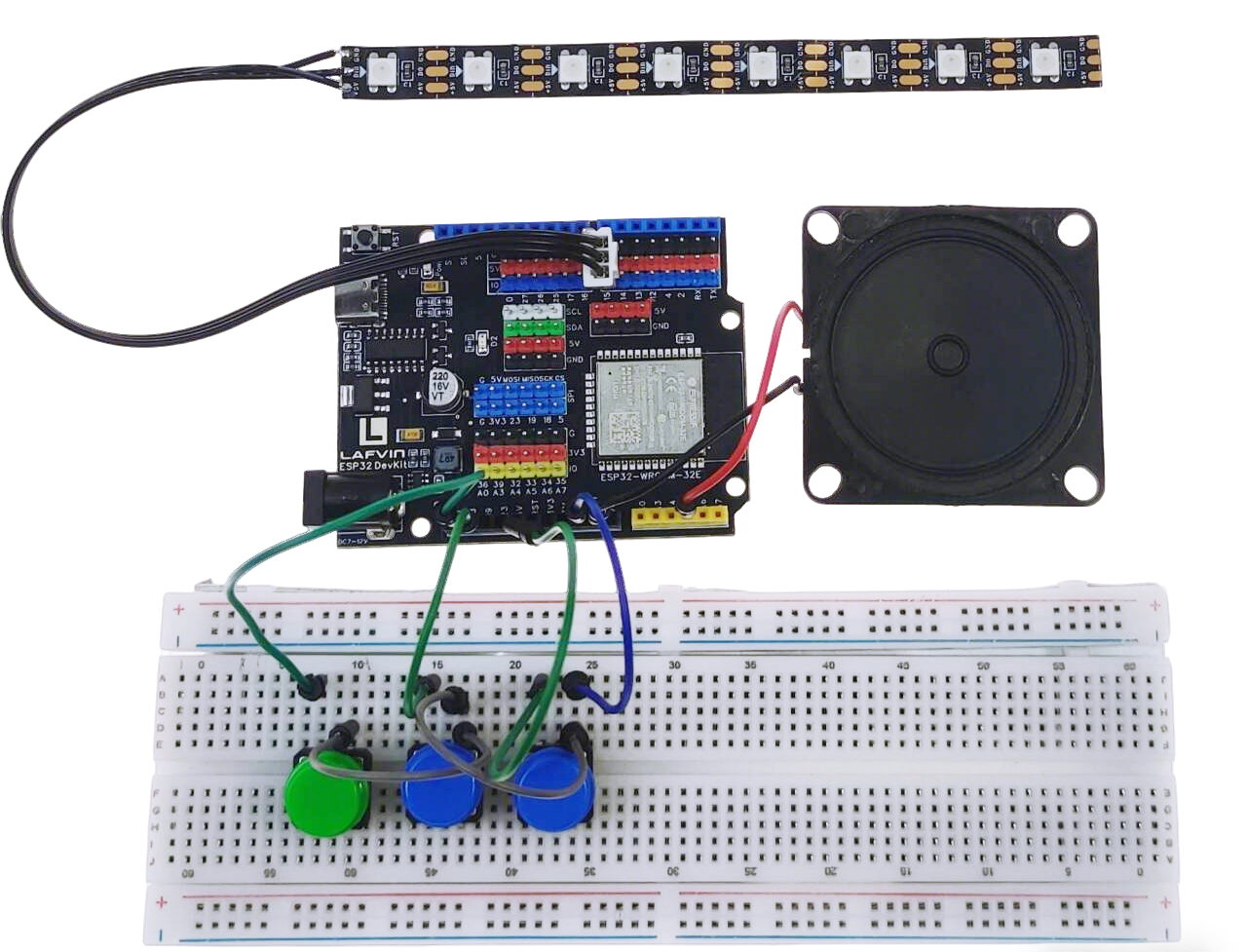
RGB —— ESP32 IO15
Button1 —— ESP32 IO5
Button2 —— ESP32 IO18
Button3 —— ESP32 IO5
Speaker —— ESP32 IO33
Example code
#include <Adafruit_NeoPixel.h>

#define BTN1 5   // Do
#define BTN2 18   // Mi
#define BTN3 19   // Sol
#define SPEAKER 33
#define LED_PIN 15

Adafruit_NeoPixel leds(3, LED_PIN, NEO_GRB + NEO_KHZ800);

// Notes for C major scale
int notes[] = {262, 294, 330, 349, 392, 440, 494};
// Our buttons: Do(0), Mi(2), Sol(4)
int buttonNotes[] = {0, 2, 4};  // Indexes in notes array

// Chord definitions
#define CHORD_C_MAJOR 0     // Do + Mi + Sol
#define CHORD_F_MAJOR 1     // Fa + La + Do
#define CHORD_G_MAJOR 2     // Sol + Si + Re

int currentChord = -1;      // -1 = no chord
bool buttons[3] = {false, false, false};
unsigned long buttonTime[3] = {0, 0, 0};

void setup() {
 Serial.begin(115200);

 pinMode(BTN1, INPUT_PULLUP);
 pinMode(BTN2, INPUT_PULLUP);
 pinMode(BTN3, INPUT_PULLUP);

 ledcSetup(0, 2000, 8);
 ledcAttachPin(SPEAKER, 0);

 leds.begin();
 leds.setBrightness(100);

 Serial.println("Chord Piano - Three Keys");
 Serial.println("Do+Mi = Interval");
 Serial.println("Do+Mi+Sol = C Major Chord");
 Serial.println("Mi+Sol = Another interval");
}

void loop() {
 // Read buttons with debounce
 readButton(0, BTN1);
 readButton(1, BTN2);
 readButton(2, BTN3);

 // Check what's being pressed
 int pressedCount = 0;
 for (int i = 0; i < 3; i++) {
   if (buttons[i]) pressedCount++;
 }

 // Play appropriate sound
 if (pressedCount == 0) {
   ledcWriteTone(0, 0);  // Stop sound
   currentChord = -1;
 }
 else if (pressedCount == 1) {
   // Single note
   for (int i = 0; i < 3; i++) {
     if (buttons[i]) {
       playSingleNote(i);
       break;
     }
   }
   currentChord = -1;
 }
 else {
   // Multiple buttons - check for chords
   checkChord();
 }

 // Update LEDs
 updateLEDs();

 delay(10);
}

void readButton(int index, int pin) {
 bool state = digitalRead(pin);

 if (state == LOW && !buttons[index]) {
   // Button just pressed
   if (millis() - buttonTime[index] > 50) {  // Debounce
     buttons[index] = true;
     buttonTime[index] = millis();
     Serial.print("Button ");
     Serial.print(index + 1);
     Serial.println(" pressed");
   }
 }
 else if (state == HIGH && buttons[index]) {
   // Button just released
   buttons[index] = false;
   Serial.print("Button ");
   Serial.print(index + 1);
   Serial.println(" released");
 }
}

void playSingleNote(int buttonIndex) {
 int noteIndex = buttonNotes[buttonIndex];
 ledcWriteTone(0, notes[noteIndex]);

 // LED feedback
 for (int i = 0; i < 3; i++) {
   if (i == buttonIndex) {
     setLEDColor(i, true);
   } else {
     setLEDColor(i, false);
   }
 }
}

void checkChord() {
 // Check which buttons are pressed
 bool doPressed = buttons[0];  // Button 1
 bool miPressed = buttons[1];  // Button 2
 bool solPressed = buttons[2]; // Button 3

 // Check for C Major chord (Do + Mi + Sol)
 if (doPressed && miPressed && solPressed) {
   if (currentChord != CHORD_C_MAJOR) {
     currentChord = CHORD_C_MAJOR;
     Serial.println("C Major Chord!");
     playChord(CHORD_C_MAJOR);
   }
 }
 // Check for Do+Mi interval
 else if (doPressed && miPressed) {
   if (currentChord != 10) {  // Custom code for this interval
     currentChord = 10;
     Serial.println("Do-Mi Interval");
     // Play alternating between Do and Mi
     static bool alt = false;
     if (alt) {
       ledcWriteTone(0, notes[0]);  // Do
     } else {
       ledcWriteTone(0, notes[2]);  // Mi
     }
     alt = !alt;
   }
 }
 // Check for Mi+Sol interval
 else if (miPressed && solPressed) {
   if (currentChord != 11) {
     currentChord = 11;
     Serial.println("Mi-Sol Interval");
     // Play alternating
     static bool alt = false;
     if (alt) {
       ledcWriteTone(0, notes[2]);  // Mi
     } else {
       ledcWriteTone(0, notes[4]);  // Sol
     }
     alt = !alt;
   }
 }
 // Check for Do+Sol interval
 else if (doPressed && solPressed) {
   if (currentChord != 12) {
     currentChord = 12;
     Serial.println("Do-Sol Interval (Perfect 5th)");
     ledcWriteTone(0, notes[0]);  // Play Do (root)
   }
 }
}

void playChord(int chordType) {
 switch(chordType) {
   case CHORD_C_MAJOR:
     // Play C Major chord (Do, Mi, Sol)
     // We'll play the root note, but could also cycle through chord notes
     ledcWriteTone(0, notes[0]);  // Do

     // Chord animation on LEDs
     static unsigned long lastBlink = 0;
     if (millis() - lastBlink > 200) {
       lastBlink = millis();
       for (int i = 0; i < 3; i++) {
         leds.setPixelColor(i,
           buttons[i] ? leds.Color(255, 255, 255) : leds.Color(0, 0, 0));
       }
       leds.show();
       delay(50);
       updateLEDs();
     }
     break;
 }
}

void setLEDColor(int index, bool pressed) {
 int colors[][3] = {{255,0,0}, {0,255,0}, {0,0,255}};

 if (pressed) {
   leds.setPixelColor(index, colors[index][0], colors[index][1], colors[index][2]);
 } else {
   leds.setPixelColor(index,
     colors[index][0]/5, colors[index][1]/5, colors[index][2]/5);
 }
}

void updateLEDs() {
 for (int i = 0; i < 3; i++) {
   setLEDColor(i, buttons[i]);
 }
 leds.show();
}
Achieved Effect
The three buttons represent Do, Mi, and Sol, allowing you to use your imagination to play some simple music.
6. ESP32 DIY Electronic Piano
Wiring diagram
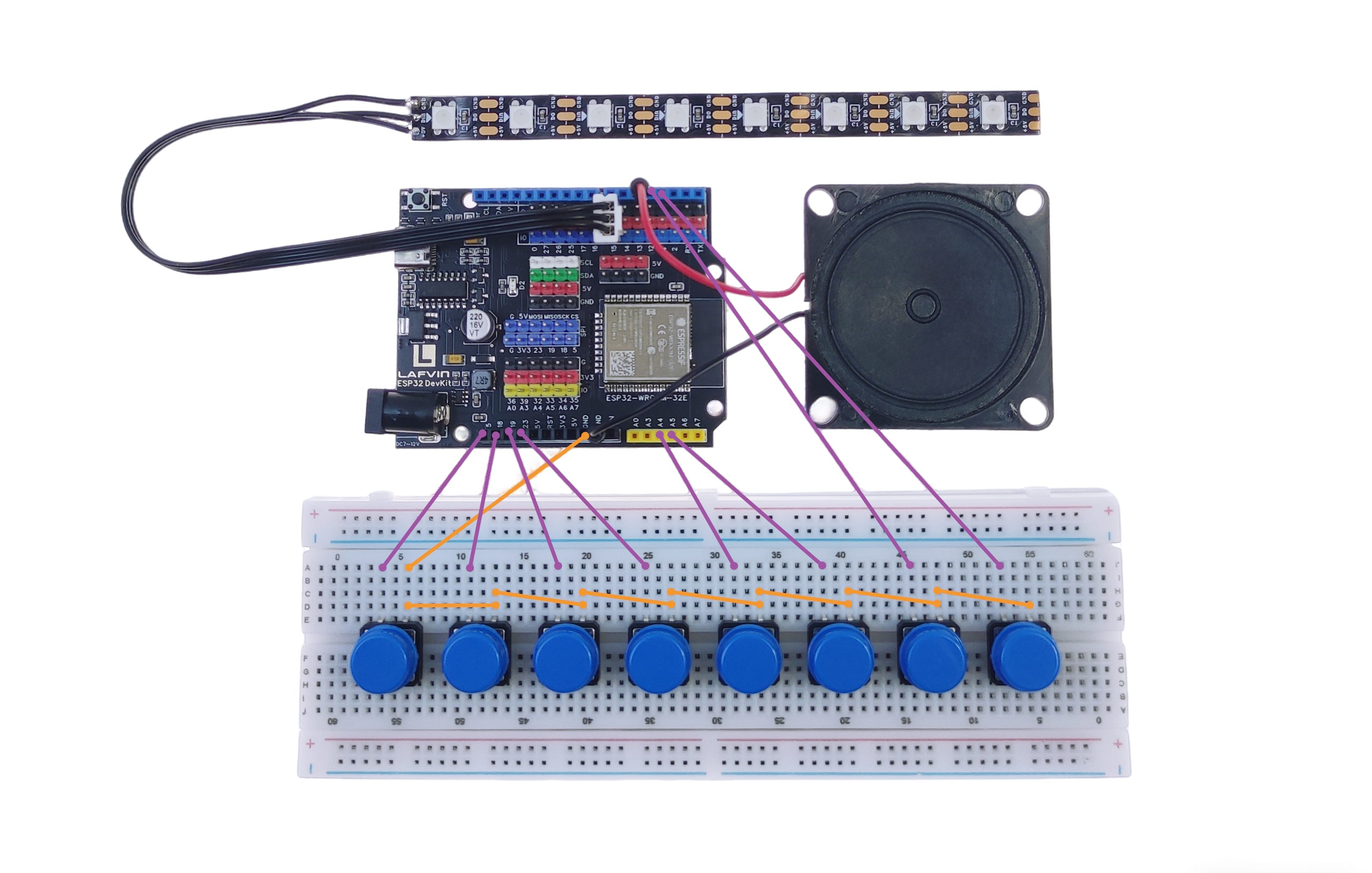
RGB —— ESP32 IO15
Button1 —— ESP32 IO5
Button2 —— ESP32 IO18
Button3 —— ESP32 IO19
Button4 —— ESP32 IO23
Button5 —— ESP32 IO32
Button6 —— ESP32 IO33
Button7 —— ESP32 IO12
Button8 —— ESP32 IO4
Speaker —— ESP32 IO13
Example code
#include <FastLED.h>
#include <WiFi.h>
#include <WebServer.h>

const char* ssid = "ESP32_Piano";
const char* password = "12345678";

WebServer server(80);

#define BUZZER_PIN     13
#define BUZZER_CHANNEL 0
#define AUTO_KEY_PIN   4

#define LED_PIN   15
#define NUM_LEDS  8
CRGB leds[NUM_LEDS];

int keyPins[7] = {5, 18, 19, 23, 32, 33, 12};
int noteFreq[7] = {262, 294, 330, 349, 392, 440, 494};

uint8_t keyColors[7] = {0, 32, 64, 96, 128, 160, 192};

#define C4 262
#define D4 294
#define E4 330
#define F4 349
#define G4 392
#define A4 440
#define B4 494
#define C5 523
#define D5 587

int song1[] = {
  C4,C4,G4,G4,A4,A4,G4,
  F4,F4,E4,E4,D4,D4,C4,
  G4,G4,F4,F4,E4,E4,D4,
  G4,G4,F4,F4,E4,E4,D4,
  C4,C4,G4,G4,A4,A4,G4,
  F4,F4,E4,E4,D4,D4,C4
};

int rhythm1[] = {
  1,1,1,1,1,1,2,
  1,1,1,1,1,1,2,
  1,1,1,1,1,1,2,
  1,1,1,1,1,1,2,
  1,1,1,1,1,1,2,
  1,1,1,1,1,1,2
};

int song2[] = {
  E4,E4,E4,  E4,E4,E4,
  E4,G4,C4,D4,E4,
  F4,F4,F4,F4,
  F4,E4,E4,E4,
  E4,D4,D4,E4,
  D4,G4,

  E4,E4,E4,  E4,E4,E4,
  E4,G4,C4,D4,E4,
  F4,F4,F4,F4,
  F4,E4,E4,E4,
  G4,G4,F4,D4,C4
};

int rhythm2[] = {
  1,1,2, 1,1,2,
  1,1,1,1,2,
  1,1,1,1,
  1,1,1,1,
  1,1,1,1,
  2,2,

  1,1,2, 1,1,2,
  1,1,1,1,2,
  1,1,1,1,
  1,1,1,1,
  2,2,2,2,4
};

int song3[] = {
  C4,C4,D4,C4,F4,E4,
  C4,C4,D4,C4,G4,F4,
  C4,C4,C5,A4,F4,E4,D4,
  B4,B4,A4,F4,G4,F4
};

int rhythm3[] = {
  1,2,1,4,4,6,
  1,2,1,4,4,6,
  1,2,4,4,4,4,6,
  1,2,4,4,6,8
};

int* songs[]   = {song1, song2, song3};
int* rhythms[] = {rhythm1, rhythm2, rhythm3};
int songLen[] = {
  sizeof(song1)/sizeof(int),
  sizeof(song2)/sizeof(int),
  sizeof(song3)/sizeof(int)
};

int songIndex = -1;
bool autoPlay = false;
uint8_t timeHue = 0;

#define BPM 120
#define NOTE_TIME (60000 / BPM / 2)

bool manualNotePlaying = false;
unsigned long manualNoteOffTime = 0;

bool webControlActive = false;
int lastWebKey = -1;
unsigned long lastWebKeyTime = 0;
#define WEB_KEY_TIMEOUT 100

void lightKeyLED(int keyIndex) {
  FastLED.clear();

  leds[keyIndex] = CHSV(keyColors[keyIndex], 255, 255);

  if (keyIndex > 0) {
    leds[keyIndex - 1] = CHSV(keyColors[keyIndex] + 20, 200, 100);
  }
  if (keyIndex < NUM_LEDS - 1) {
    leds[keyIndex + 1] = CHSV(keyColors[keyIndex] - 20, 200, 100);
  }

  FastLED.show();
}

uint8_t freqToHue(int freq) {
  freq = constrain(freq, 262, 587);
  return map(freq, 262, 587, 180, 0);
}

void colorBurst(uint8_t baseHue, uint8_t brightness) {
  for (int i = 0; i < NUM_LEDS; i++) {
    leds[i] = CHSV(baseHue + i * 18 + timeHue, 255, brightness);
  }
  timeHue += 6;
  FastLED.show();
}

void rainbowChase(uint8_t baseHue, int step) {
  fadeToBlackBy(leds, NUM_LEDS, 60);
  leds[step % NUM_LEDS] = CHSV(baseHue + timeHue, 255, 255);
  timeHue += 10;
  FastLED.show();
}

void rainbowBreath(uint8_t baseHue, uint8_t brightness) {
  for (int i = 0; i < NUM_LEDS; i++) {
    leds[i] = CHSV(baseHue + i * 12 + timeHue, 200, brightness);
  }
  timeHue += 3;
  FastLED.show();
}

void playNote(int noteIndex, bool fromWeb = false) {
  if (noteIndex >= 0 && noteIndex < 7) {
    ledcWriteTone(BUZZER_CHANNEL, noteFreq[noteIndex]);
    lightKeyLED(noteIndex);
    manualNoteOffTime = millis() + NOTE_TIME;
    manualNotePlaying = true;

    if (fromWeb) {
      webControlActive = true;
      lastWebKey = noteIndex;
      lastWebKeyTime = millis();
    }
  }
}

void startAutoPlay() {
  autoPlay = true;
  songIndex = (songIndex + 1) % 3;
  webControlActive = true;
}

const char* htmlContent = R"rawliteral(
<!DOCTYPE html>
<html lang="en">
<head>
    <meta charset="UTF-8">
    <meta name="viewport" content="width=device-width, initial-scale=1.0">
    <title>ESP32 Piano</title>
    <style>
        * {
            margin: 0;
            padding: 0;
            box-sizing: border-box;
        }

        body {
            background: #000;
            height: 100vh;
            display: flex;
            justify-content: center;
            align-items: center;
            font-family: Arial, sans-serif;
        }

        .piano-keys {
            display: flex;
            width: 95%;
            height: 70vh;
            gap: 10px;
            padding: 10px;
        }

        .piano-key {
            flex: 1;
            display: flex;
            flex-direction: column;
            justify-content: center;
            align-items: center;
            border-radius: 15px;
            cursor: pointer;
            user-select: none;
            transition: transform 0.1s;
            font-weight: bold;
            font-size: 2.5em;
            box-shadow: 0 5px 15px rgba(0,0,0,0.3);
        }

        .key-1, .key-3, .key-5, .key-7 {
            background: white;
            color: black;
        }

        .key-2, .key-4, .key-6 {
            background: black;
            color: white;
            border: 2px solid #333;
        }

        .key-auto {
            background: linear-gradient(45deg, #ff3366, #33ccff);
            color: white;
        }

        .piano-key:active {
            transform: scale(0.95);
        }

        .key-number {
            font-size: 1.2em;
            margin-bottom: 5px;
        }

        .key-text {
            font-size: 0.6em;
        }
    </style>
</head>
<body>
    <div class="piano-keys">
        <div class="piano-key key-1" data-key="0">
            <div class="key-number">1</div>
            <div class="key-text">Do</div>
        </div>
        <div class="piano-key key-2" data-key="1">
            <div class="key-number">2</div>
            <div class="key-text">Re</div>
        </div>
        <div class="piano-key key-3" data-key="2">
            <div class="key-number">3</div>
            <div class="key-text">Mi</div>
        </div>
        <div class="piano-key key-4" data-key="3">
            <div class="key-number">4</div>
            <div class="key-text">Fa</div>
        </div>
        <div class="piano-key key-5" data-key="4">
            <div class="key-number">5</div>
            <div class="key-text">Sol</div>
        </div>
        <div class="piano-key key-6" data-key="5">
            <div class="key-number">6</div>
            <div class="key-text">La</div>
        </div>
        <div class="piano-key key-7" data-key="6">
            <div class="key-number">7</div>
            <div class="key-text">Si</div>
        </div>
        <div class="piano-key key-auto" data-key="auto">
            <div class="key-number">AUTO</div>
        </div>
    </div>

    <script>
        document.querySelectorAll('.piano-key').forEach(key => {
            key.addEventListener('mousedown', function() {
                const keyData = this.dataset.key;

                if (keyData === 'auto') {
                    fetch('/auto');
                } else {
                    fetch(`/play?key=${keyData}`);
                }

                this.style.transform = 'scale(0.95)';
            });

            key.addEventListener('mouseup', function() {
                this.style.transform = '';
            });

            key.addEventListener('mouseleave', function() {
                this.style.transform = '';
            });

            key.addEventListener('touchstart', function(e) {
                e.preventDefault();
                const keyData = this.dataset.key;

                if (keyData === 'auto') {
                    fetch('/auto');
                } else {
                    fetch(`/play?key=${keyData}`);
                }

                this.style.transform = 'scale(0.95)';
            });

            key.addEventListener('touchend', function() {
                this.style.transform = '';
            });
        });

        document.addEventListener('keydown', function(e) {
            if (e.key >= '1' && e.key <= '7') {
                const keyIndex = parseInt(e.key) - 1;
                const keyElement = document.querySelector(`[data-key="${keyIndex}"]`);
                if (keyElement) {
                    keyElement.style.transform = 'scale(0.95)';
                    fetch(`/play?key=${keyIndex}`);
                }
            }

            if (e.key === 'a' || e.key === 'A') {
                const autoKey = document.querySelector('[data-key="auto"]');
                if (autoKey) {
                    autoKey.style.transform = 'scale(0.95)';
                    fetch('/auto');
                }
            }
        });

        document.addEventListener('keyup', function(e) {
            if (e.key >= '1' && e.key <= '7') {
                const keyIndex = parseInt(e.key) - 1;
                const keyElement = document.querySelector(`[data-key="${keyIndex}"]`);
                if (keyElement) {
                    keyElement.style.transform = '';
                }
            }

            if (e.key === 'a' || e.key === 'A') {
                const autoKey = document.querySelector('[data-key="auto"]');
                if (autoKey) {
                    autoKey.style.transform = '';
                }
            }
        });
    </script>
</body>
</html>
)rawliteral";

void handleRoot() {
  server.send(200, "text/html", htmlContent);
}

void handlePlay() {
  if (server.hasArg("key")) {
    int keyIndex = server.arg("key").toInt();
    if (keyIndex >= 0 && keyIndex < 7) {
      playNote(keyIndex, true);
      server.send(200, "text/plain", "OK");
    }
  }
}

void handleAuto() {
  startAutoPlay();
  server.send(200, "text/plain", "OK");
}

void setup() {
  Serial.begin(115200);

  for (int i = 0; i < 7; i++) pinMode(keyPins[i], INPUT_PULLUP);
  pinMode(AUTO_KEY_PIN, INPUT_PULLUP);

  ledcSetup(BUZZER_CHANNEL, 2000, 8);
  ledcAttachPin(BUZZER_PIN, BUZZER_CHANNEL);

  FastLED.addLeds<WS2812, LED_PIN, GRB>(leds, NUM_LEDS);
  FastLED.setBrightness(200);
  FastLED.clear();
  FastLED.show();

  WiFi.softAP(ssid, password);
  Serial.println("AP Started");
  Serial.print("SSID: ");
  Serial.println(ssid);
  Serial.print("IP: ");
  Serial.println(WiFi.softAPIP());

  server.on("/", handleRoot);
  server.on("/play", handlePlay);
  server.on("/auto", handleAuto);

  server.begin();
  Serial.println("Web Server Started");
}

void loop() {
  server.handleClient();

  if (webControlActive && (millis() - lastWebKeyTime > WEB_KEY_TIMEOUT)) {
    if (millis() > manualNoteOffTime) {
      webControlActive = false;
    }
  }

  if (autoPlay && songIndex >= 0 && songIndex < 3) {
    static int noteIndex = 0;
    static unsigned long nextNoteTime = 0;

    if (millis() >= nextNoteTime) {
      if (noteIndex < songLen[songIndex]) {
        int freq = songs[songIndex][noteIndex];
        ledcWriteTone(BUZZER_CHANNEL, freq);

        uint8_t hue = freqToHue(freq);
        if (songIndex == 0) colorBurst(hue, 255);
        else if (songIndex == 1) rainbowChase(hue, noteIndex);
        else rainbowBreath(hue, 200);

        int delayTime = 220 * rhythms[songIndex][noteIndex];
        nextNoteTime = millis() + delayTime;
        noteIndex++;
      } else {
        noteIndex = 0;
        autoPlay = false;
        webControlActive = false;
        ledcWriteTone(BUZZER_CHANNEL, 0);
      }
    }
  }

  if (!webControlActive && !autoPlay) {
    if (manualNotePlaying && millis() > manualNoteOffTime) {
      ledcWriteTone(BUZZER_CHANNEL, 0);
      manualNotePlaying = false;
    }

    if (!manualNotePlaying) {
      for (int i = 0; i < 7; i++) {
        if (digitalRead(keyPins[i]) == LOW) {
          playNote(i, false);
          break;
        }
      }
    }

    if (digitalRead(AUTO_KEY_PIN) == LOW) {
      delay(20);
      if (digitalRead(AUTO_KEY_PIN) == LOW) {
        startAutoPlay();
        while (digitalRead(AUTO_KEY_PIN) == LOW);
      }
    }
  }

  if (!manualNotePlaying && !autoPlay) {
    fadeToBlackBy(leds, NUM_LEDS, 30);
    FastLED.show();
  }

  delay(5);
}
Achieved Effect
Extended code
You can modify the code in the three autoplay tracks to change them to your preferred music.
For example, if you want to modify the first song, you only need to modify the two code snippets shown in the image to match the rhythm of the corresponding song.
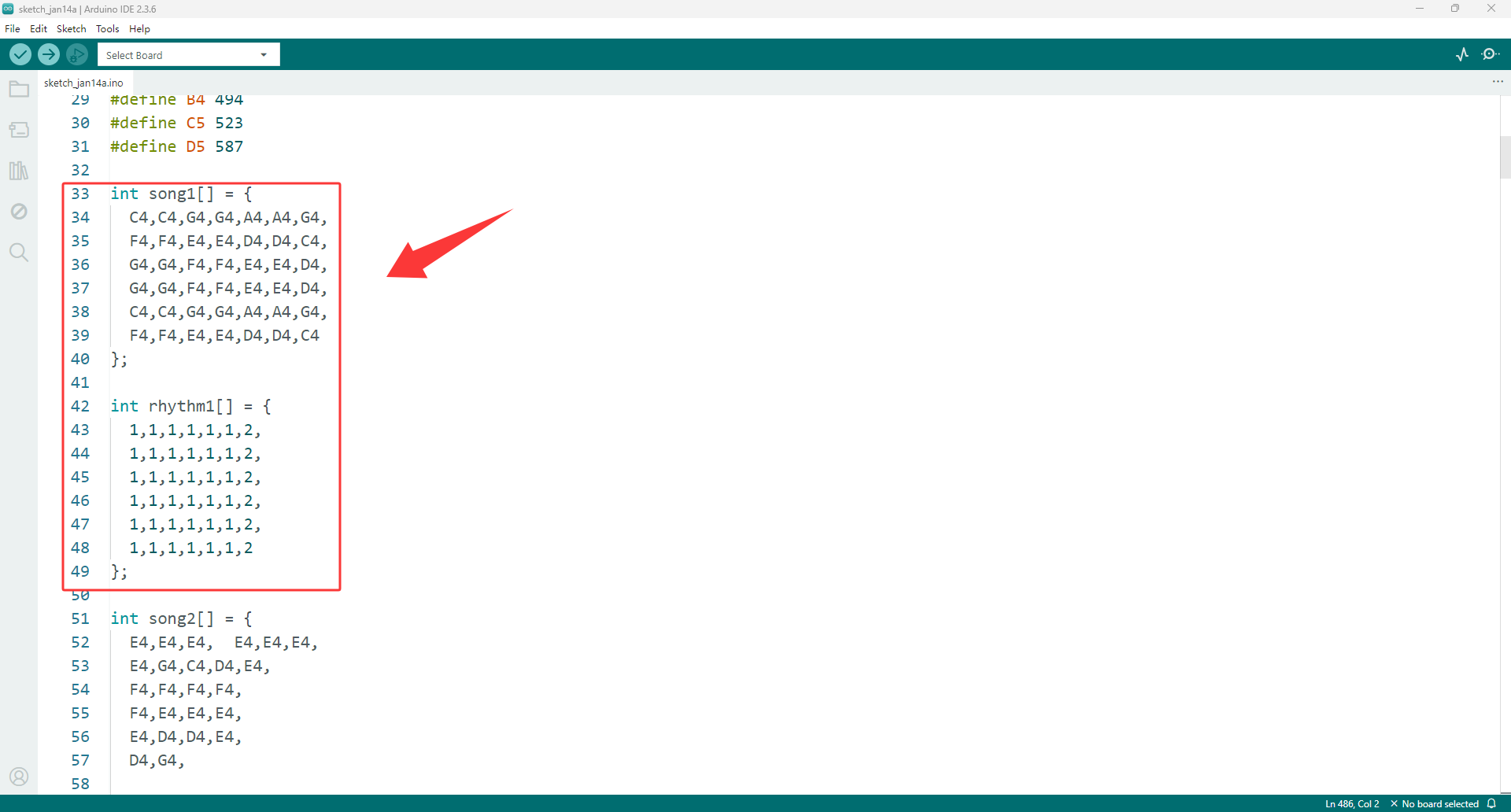
For example, to change the first song to “Ode to Joy”, simply modify the original code as follows.
 int song1[] = {
 E4,E4,F4,G4,G4,F4,E4,D4,
 C4,C4,D4,E4,E4,D4,D4,
 E4,E4,F4,G4,G4,F4,E4,D4,
 C4,C4,D4,E4,D4,C4,C4
};
 int rhythm1[] = {
 2,2,2,2,2,2,2,2,
 2,2,2,2,3,1,2,
 2,2,2,2,2,2,2,2,
 2,2,2,2,2,2,4
};
Note
The number of notes must match the number of rhythms; otherwise, playback will fail.
Predefined pitch constants can be used: C4, D4, E4, F4, G4, A4, B4, C5, D5.
You can use your imagination to combine any tone to create your own music.